How to Choose Keyboard Cleaning Tools for Home Offices
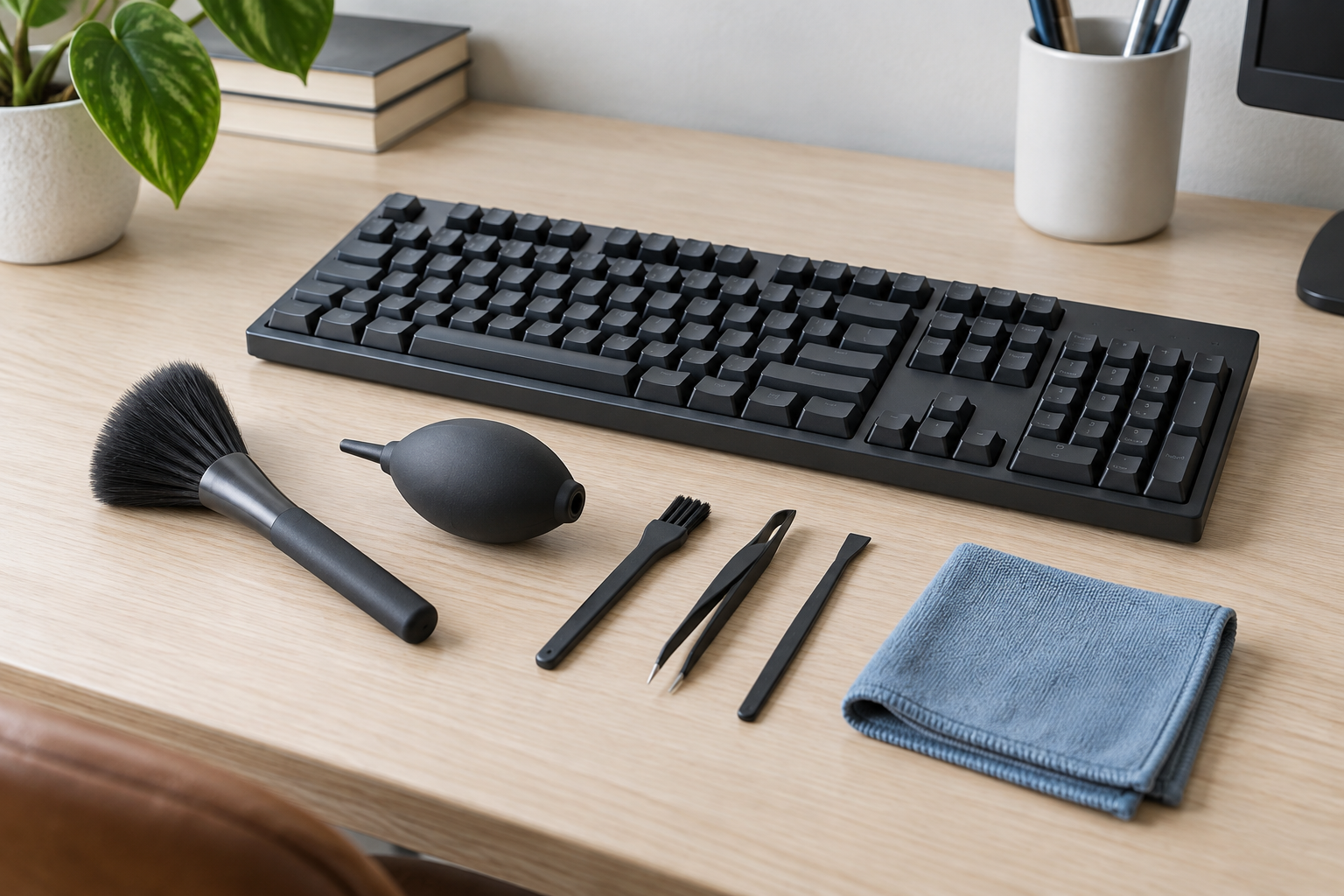
Keyboard-cleaning kits become clutter when every attachment solves the same easy job. Start with what is actually between the keys—loose crumbs, surface dust, or residue—then choose the least aggressive tool permitted by the keyboard maker. A soft brush, controlled hand blower, and washable cloth cover most routine home-office cleanup without turning it into a repair project.
As an Amazon Associate, The Good Home Doc may earn from qualifying purchases.
Quick decision before shopping
First measure the available space, identify the setup or surface constraints, and decide who will maintain the item. Skip the category if it blocks access, conflicts with the manufacturer's instructions or lease, or adds more upkeep than the problem justifies.
Compare a compact kit only after checking the keyboard maker's instructions:
- Browse category: Compare keyboard cleaning brushes and hand blowersLook for a clearly described soft brush, controllable blower nozzle, washable-cloth care, covered edges, and a case that fits the tools you will use.
This is a category search, not a tested ranking. Confirm current contents, materials, tool dimensions, care instructions, device compatibility, and return terms before buying.
Match the tool to the debris
| Tool format | Useful for | Check before buying |
|---|---|---|
| Soft detailing brush | Loose dust and crumbs around key edges and the case | Bristle softness, shedding, head width, covered ferrule edges, and wash or replacement guidance |
| Hand-squeeze air blower | Moving loose debris from narrow gaps with short, controllable puffs | Nozzle length, one-way valve, grip size, storage cap, and the device maker's air-cleaning limits |
| Narrow nonmetal detail tool | Accessible seams only when the keyboard instructions permit it | Rounded edges, thickness, flexibility, and whether it can touch switches or key mechanisms |
| Microfiber cloth | Wiping the keyboard case and key tops under the maker's directions | Clean edge-free construction, laundering, lint, and whether the device instructions permit any dampening |
| Reusable cleaning kit | Keeping a small matched set together | Whether each included piece has a real job, plus case size, cleaning, drying, and replacement parts |
A large attachment count is not a sign of a better kit. It often means more pieces to identify, clean, dry, and store. Choose the smallest set that covers your routine debris without duplicating tools already in the home.
Read the keyboard instructions before touching a key
Turn the device off and disconnect it only as its manufacturer directs. Check the current support page or manual for the exact model before using air, moisture, a removable keycap tool, or anything that enters a gap. Laptop keyboards, low-profile boards, mechanical switches, coated keycaps, and illuminated models can have different restrictions.
For example, Apple's published cleaning guidance tells readers to shut down and unplug products before cleaning and gives product-specific limits for moisture, sprays, abrasives, and compressed air. That is useful as an example of why generic kit directions cannot replace the device maker's instructions; follow the guidance for your own keyboard rather than assuming one brand's method applies to another.
Softness and control matter more than reach
A brush should move loose material without forcing its ferrule, handle, or stiff bristle ends between keys. Compare the brush head with the keyboard's visible gaps. A broad, soft brush suits open surfaces; a smaller brush offers better control at edges. Stop if bristles snag, shed, or require pressure.
A hand-squeeze blower gives short bursts without batteries or a disposable can, but it still needs control. Keep the nozzle from striking the keys and do not use airflow to drive debris deeper into the case. Avoid claims that a blower is automatically “safe for electronics.” The permitted method, direction, and distance come from the keyboard maker.
Be cautious with gels, vacuums, liquids, and metal tools
Sticky cleaning compounds can leave material behind, change with age, or reach places where removal is difficult. Small vacuums add suction, hard nozzle edges, filters, charging, and their own cleaning routine. Neither category is a default upgrade over a brush and controlled blower.
Do not insert metal tweezers, picks, or improvised tools into the keyboard. Do not spray cleaner directly on the device or let liquid enter openings. If the maker permits a lightly dampened cloth or a specified cleaning product, apply it exactly as directed and keep excess liquid away from gaps. A spill, sticky switch, damaged key, swollen battery, unusual heat, or electrical fault is not a routine cleaning job; stop using the device and follow manufacturer support or qualified repair guidance.
Must-haves and nice-to-haves
Must-haves
- A tool format permitted by the keyboard's current care instructions.
- Soft, clean contact surfaces with no exposed sharp edges.
- A controllable size and grip that do not require force between keys.
- Clear directions for washing, drying, or replacing reusable parts.
- A dry storage case or pouch that keeps the tools away from general household grime.
Nice-to-haves
- A removable brush head when replacements are actually sold.
- A blower cap that protects the nozzle in storage.
- Two brush widths for broad surfaces and accessible edges.
- A light-colored cloth that makes collected dirt easy to see.
Plan the cleanup and storage routine
Work over a clear desk with room to move the keyboard as its maker permits. Use the broadest gentle tool first, then reassess before reaching for a detail attachment. Collect loosened debris from the desk instead of blowing it toward a monitor, ports, vents, or other equipment.
Clean reusable tools according to their own instructions and let them dry completely before returning them to a closed case. A kit stored beside drinks, snacks, or loose desk supplies will collect the same debris it is meant to remove. A small lidded box or washable pouch is useful only if every tool is dry and easy to identify.
Who should skip a dedicated kit?
- People whose keyboard maker recommends only a cloth or another specific method they already have.
- Anyone dealing with a spill, damaged keys, battery swelling, overheating, or an electrical problem rather than ordinary surface debris.
- Households where a clean soft brush and approved cloth already handle the routine job.
- Users who cannot confirm whether air, moisture, key removal, or gap tools are permitted for the exact device.
- Anyone tempted by a large kit whose extra pieces have no defined use.
Bottom line
For most home offices, the best keyboard-cleaning setup is deliberately small: a soft brush for loose debris, a controllable hand blower when the maker permits airflow, and a clean cloth used under the device's care instructions. Buy by softness, control, washable-part care, and storage—not attachment count. Skip any tool that requires force, enters an unapproved gap, or turns routine cleaning into device repair.
Next step: Put this decision in context with the home-product buying framework guide.